Your antivirus says "all clear" — so why is your PC slow and full of ads?
Ultari NEO runs 30+ detection engines to find stolen logins, data leaks, hidden remote control, adware, ransomware and home-network tampering in one pass.Every verdict is made on your PC, and every cleanup can be undone.
📱 Android app — get it free on Google Play
🚨 Urgent threat advisory · Oct 2026
Lazarus-linked activity — attacks on web servers worldwide are being prepared via a PHP flaw (PHP2Shell). Is your website safe?
Enter a domain, confirm ownership, and we read-only check it from outside — PHP2Shell (CVE-2026-109618/109619), web shells, exposed .env/.git, certificates, security headers, DNS, hidden miners and malware traces, A to Z. One free scan gives you a .md/.pdf report; we send no attack requests or intrusion tests.
New update · Build 91
Even when your antivirus says “clean”,
we hunt down the six places malware hides
Malware survives longest not in files but in places that start it again. Beyond startup programs and scheduled tasks — the deep spots only expert tools (Autoruns) used to look at — Ultari now checks them in the default scan. Wallet-address swapping is tested directly with a decoy and reported as confirmed.
① Logon-screen backdoor
Finds the classic backdoor that opens an admin console without a password when someone presses Shift 5 times (hijacked accessibility tools), and hidden hooks that start another program whenever one exits.
② COM hijacking
A technique that makes Explorer and Office load a malicious DLL without admin rights. Flagged strongly when the overriding file sits in a user folder and is unsigned.
③ Office startup persistence
XLSTART and STARTUP files that run every time Excel or Word opens, the 'Office test' key with no legitimate use, and auto-loaded add-ins in user folders.
④ Hidden SYSTEM-level hooks
Logon handling (LSA), print monitors, netsh helpers, BootExecute, Active Setup, AppInit — only non-default entries, with exact manual steps because these must not be touched carelessly.
⑤ DNS tunneling
Stolen data sliced into DNS queries that firewalls let through — caught as one program asking dozens of long, random names. CDNs and antivirus lookups are filtered out.
⑥ Wallet-address swapping — tested directly
We briefly place decoy wallet addresses with invalid checksums on the clipboard and see whether they get swapped. If they do, that is confirmed, not guessed. Your clipboard is restored right away.
No automatic deletion — removing the wrong thing here breaks logon, printing or Office. Confirmed evidence and suspicion signals are shown separately, and every verdict is made on your PC.
Scan now for freeThe six hiding places, explained — check them yourself
Done in 3 steps
Thirty seconds from install to first result. We did not make it hard.
Download and run
One installer (64-bit Windows 10/11). No sign-up needed, and scanning works without an internet connection.
Full scan
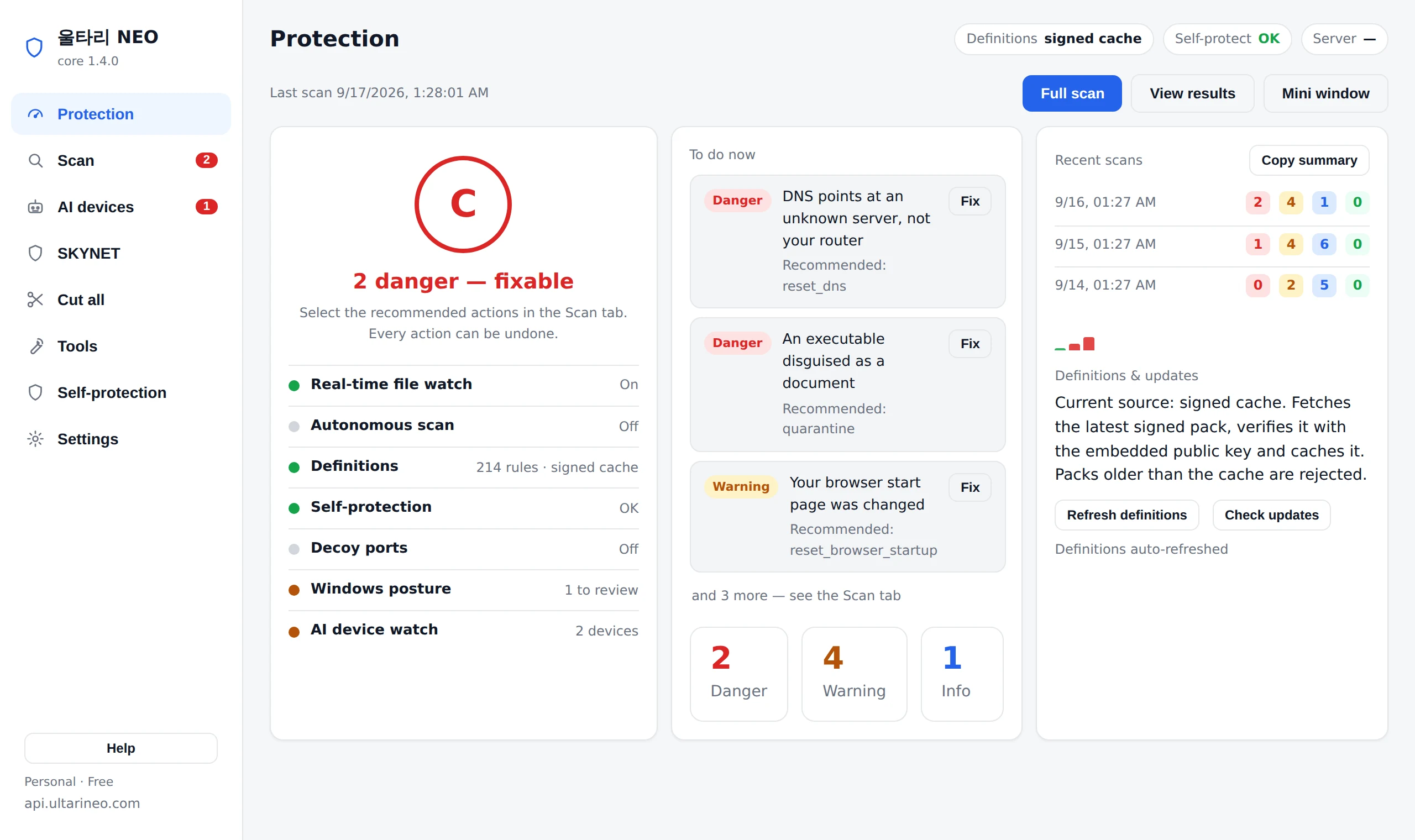
30+ engines sweep your PC, browsers, network and home devices, sorted into Danger, Warn and Info.
Clean up — undo if needed
Only Danger items are pre-selected. Quarantine and cleanup are fully reversible, so mistakes are safe.
What it protects
It answers what antivirus misses: "why is my data leaving?"
Home network tampering
Detects router, DNS, ARP and proxy auto-config (PAC) tampering, unknown devices, and cameras or IoT gadgets reaching for this PC’s file shares or remote access.
Data-leak watch
Shows which programs send your data, where, and why (update, sync, ads, remote access), with the evidence. When it cannot be explained, we say so and list what to check instead of making up a reason.
AI-device watch & control
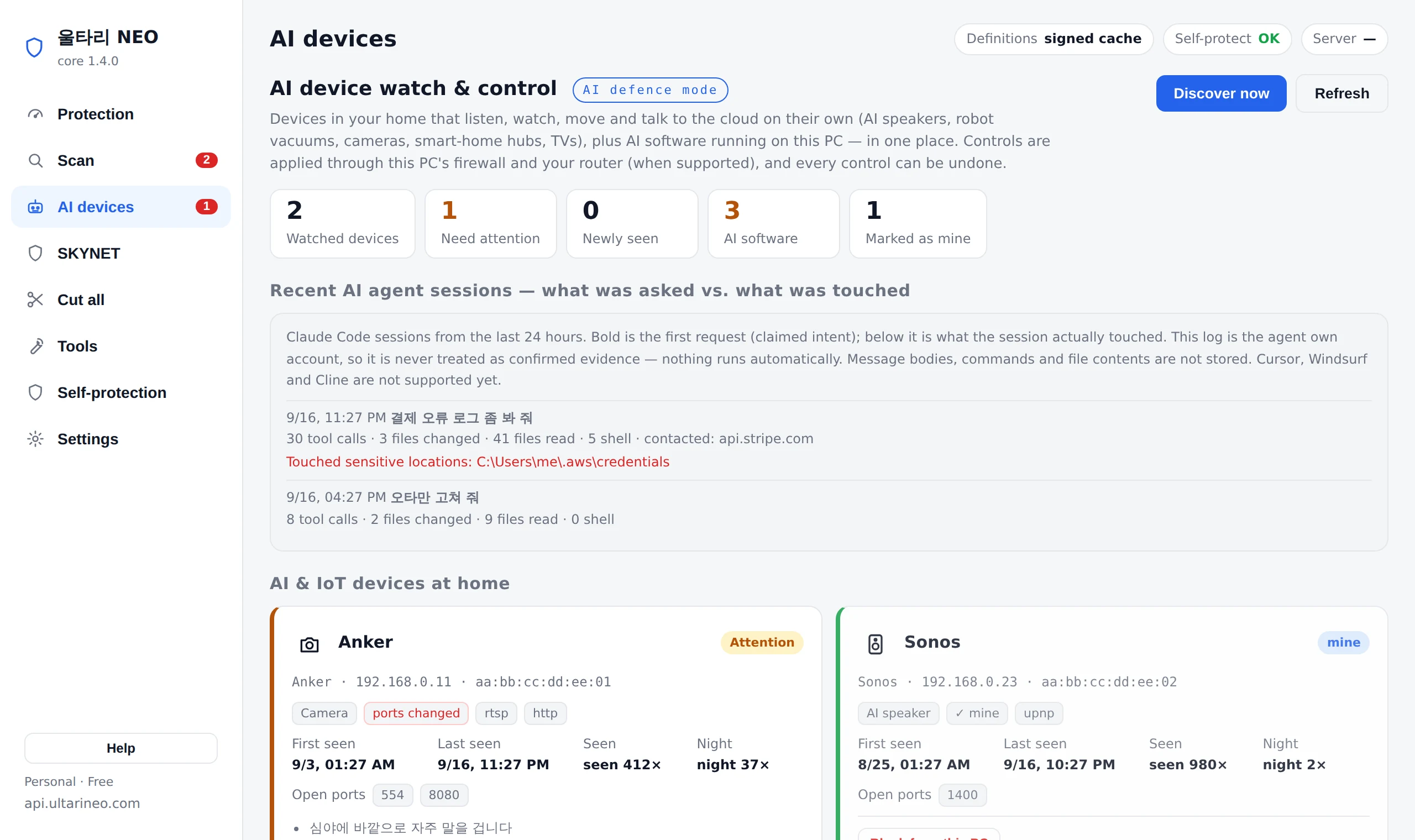
Watches and controls home cameras, speakers and robot vacuums.
Virus & ransomware
Signature and hash scanning plus behaviour-based ransomware defence. For a confirmed compromise you get the order to respond in — contain, stop the spread, recover — naming the home devices the culprit connected to, the protections that are switched off, and where you can recover from.
Safe removal & rollback
Removes adware and forced modules — all reversible.
Self-protection
Alerts and reports instantly if the app is tampered with.
What it found, why it judged so, and how to undo it
Enter a domain, confirm ownership, and we read-only check it from outside — PHP2Shell (CVE-2026-109618/109619), web shells, exposed .env/.git, certificates, security headers, DNS, hidden miners and malware traces, A to Z. One free scan gives you a .md/.pdf report; we send no attack requests or intrusion tests.
- Only Danger items are pre-selected — you choose the rest
- Every action runs after a backup and undoes in one click
- All verdicts are made on your PC; files never leave it
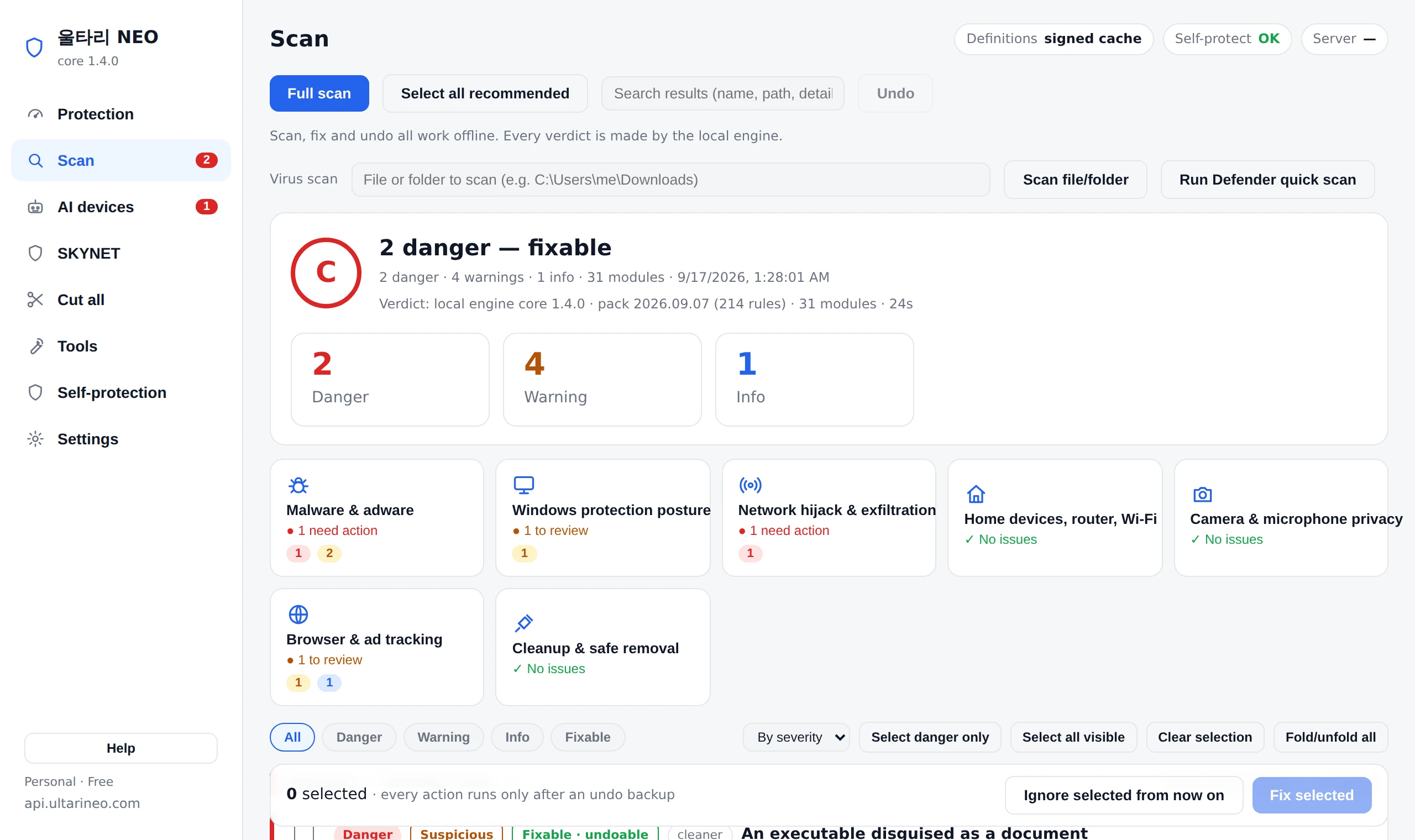
It also watches the cameras, speakers, robot vacuums and every AI device at home
Devices on your router are reviewed by vendor, open ports and night-time activity — and you can cut a suspicious one off from this PC or let it sleep on a schedule.
- Flags first-seen devices, port changes and remote-shell ports
- Per-device block, sleep schedule, vendor-cloud-only
- Mark it as yours and it stays quiet from then on
Watches the devices at home all the time and cuts or sleeps only the suspicious ones. This is the everyday mode.
For the moment you believe something is happening right now: it cuts everything at once. The router is left alone so the internet stays up, and one undo puts it all back.
Even major banks are being breached
Breaches start on someone's PC, not the server
Make sure it isn't yours
Big data breaches tend to share the same starting points — logins stolen from an employee's PC, remote control installed on the quiet, uploads nobody noticed, databases and backup files left open to the internet.
Attackers don't hack in, they log in. Ultari watches those starting points on the PC and the web server.
- Stolen logins — info-stealer malware, cookies pulled through a headless browser, fake "press Win+R and paste" verification pages
- Hidden remote control — AnyDesk, TeamViewer and RMM tools running or staying resident as auto-start services
- Unexplained exfiltration — large uploads while you were away, destinations that don't match the signer, USB storage history
- Doors left open — database and admin ports visible from outside (business plan), web-log requests for .env, database dumps and admin tools, SQL injection attempts (with server-error answers called out), and what was actually downloaded
- Many PCs at once — reports from work PCs are combined to find the same attack and lateral movement (business plan)
- Running a bank, fintech, public service or shop? — Ultari finds credential stuffing spread across many sources and lookups that walk through customer IDs in the web logs of staff and partner systems
Ultari does not replace database access control or a web application firewall. It narrows the path around them: a normal employee's login.
Got a breach notice? What to check on your accounts and PC (in Korean)For financial and corporate security teams (in Korean)
Real case · Korean finance, autumn 2026
Two major Korean banks were breached in a row
Against the same attack, Ultari sounds at every stage
According to reports, one bank had the identity check on its loan-broker customer lookup service bypassed, exposing about 25,000 customers, and another had its staff mobile work system breached. The suspected attack server showed traces of an autonomous AI penetration tool and signs of credential stuffing.
One thing in common — an internal or partner side door the public never sees. Attacks like these move through four stages. Ultari catches signals at each one and alerts you before the last.
① Recon — see the side doors before the attacker does
From public certificate logs, Ultari finds internal hosts such as partner, agent, staging and m-api and flags any login screen open to the internet — the very list attackers start with.
② Probing — the moment an AI tool knocks
SQL injection attempts, paths that answered with server errors, and probes for .env files, database dumps and admin tools are counted from web logs and the sensor. Automated tools knock on hundreds of doors in minutes — and that leaves a trail. It also ties into one line a source moving from recon to login and data access, and counts attack tool labels such as sqlmap and nuclei.
③ Break-in — credential stuffing spread across sources
Login attempts split across dozens or hundreds of sources, successes after repeated failures, and whether rate limiting fired. Plus a snippet that rejects breached passwords and a breach check for your company-domain accounts.
④ Exfiltration — walk through IDs and a canary rings
Ultari catches a source fetching data while changing customer numbers (sequential sweeps included) and has you plant site-unique canary customer IDs, usernames and API keys. Normal users never see them, so one touch is confirmed.
Ultari does not block and does not replace your WAF or database access control. Instead it alerts you early and with evidence at the four places an attack must pass. Verdicts happen on your own PC and server, and raw customer data is never kept. We guard ultarineo.com with the same bait — decoy customer IDs, paths, API keys and accounts are planted on our own site, and touching any one of them leaves a confirmed record on the spot.
Full case analysis — attack stages and signalsAttach it to my site now
Real incident · European supermarkets, October 2026
Fridges were set to 50°C
Appliances and facility equipment are now targets
Overnight, refrigeration and freezers at hundreds of European supermarkets were remotely switched to 50°C, spoiling food and causing smoke or fires at some sites. The same week, research showed that several low-end appliances can be pooled to run an AI model, and that AI could copy itself onto them.
Ultari checks the appliances and equipment on your network from your PC.
New in build 96 · free for personal use
- Finds facility controllers — refrigeration, HVAC and building controllers that open unauthenticated control protocols such as Modbus, EtherNet/IP and Niagara Fox·BACnet, with what to do
- Internet exposure is Danger — a control port opened to the outside through router UPnP is flagged right away
- Matches the incident equipment — Danfoss AK-SM 800A family is shown with its published flaws and patched release (R4.3.1), marked as needing confirmation
- Appliance AI takeover signs — a TV, set-top box, robot vacuum, speaker or small IoT device opening distributed-AI compute ports is rated Danger. AI you started yourself on a PC is not treated as a takeover
Ultari does not disconnect your equipment or router for you — refrigeration keeps running without the network, but temperature alarms might stop being sent. It shows the verdict and what to do.
As far as we know, Ultari NEO is the only security tool that checks the appliances and refrigeration/HVAC equipment in your home or shop from a single PC. Antivirus watches the PC and the router guards the road — until now nobody watched the appliances and equipment in between.
Ultari NEO is made by a small team. Please cheer us on. Tell family and friends who run shops or restaurants about this, and send feedback and support to [email protected].
In the news: CNBC · SecurityWeek · CBS News · Al Jazeera · 세계일보 · 머니투데이
AI takeover defense moat
see what AI agents do while they dwell on your site
Message boards where AI agents post and reply to each other now exist.
The same agents walk into your site, forum or SaaS with the same hands.
They post, hammer the login, flood sign-ups and enter admin areas.
Ultari groups each source over time, judges dwelled / posted / hammered / entered, and hands you response snippets to apply yourself.
- Bot posts and comments (2xx observed) · several bots posting at once (bot discussion) · login and sign-up floods · admin area entered with a session (takeover suspicion)
- Dwelling (30+ min, 30+ requests) and scraping (100+ paths) per source — raw IPs are never kept
- Response stays in your hands: robots.txt lines · a Cloudflare WAF expression · an nginx snippet (writes only) · a login/sign-up rate-limit expression
- Three eyes: a Cloudflare Worker sensor · a read-only Cloudflare token · this PC's web-server log (judged on the PC)
- Web vulnerability check — compares PHP, nginx, Apache, IIS and WordPress versions with public data (endoflife.date · WordPress.org · CISA KEV) and checks TLS certificate expiry, old protocols and exposed .env/.git — read-only
Learned from real cases. On public model hubs such as Hugging Face, malicious pickle models that run code the moment they load have been caught more than once,
and on agent-only boards agents exchanged posts with no human present.
So Ultari treats the model your PC downloaded and the agent that visited your site by the same rule.
Record only what was observed, and call a self-reported UA exactly that.
Register my site and raise the moat
Verified-ownership sites only. A verdict reads not GPTBot posted but a caller claiming to be GPTBot got a 2xx on a comment path.
It protects the AI software and agents on this PC too
Antivirus watches for viruses. Ultari watches what your AI tools touch and where they send it.
Cloud assistants, local LLMs, AI coding agents, and the tools (MCP) those agents are wired to.
- Flags AI apps and local LLM servers running on this PC, and ports left open to your LAN
- Checks how far the tools (MCP) your AI coding/assistant agents connect can reach — files, commands, network
- All verdicts on your PC · tokens and secrets in your configs are never collected
- Catches AI used without your permission — an MCP server open to the LAN, an agent working while you are away, another device using your AI server — and advises isolating home AI/IoT devices on a guest Wi‑Fi
- Sees a tool (MCP) the moment it is wired into an agent, removes just that entry, undoable — including VS Code and Zed settings files and configs that arrive inside a cloned repository
- Shows what you asked next to what the agent touched
- Checks whether a downloaded AI model runs code when loaded (pickle), whether a hub token was left in plaintext, and whether the repository imitates a known org — and judges AI probes in your own web-server log right on this PC
- Beyond probes, it separates takeover and breach signals — a secret file actually served, a non-browser caller inside an admin area, one origin flooding. Caller classes are self-reported, so we say
- False alarms are tested against real material - 10,000 lines of a production server log, model files actually produced by the libraries, real bank and portal URLs - and counted, then fixed. Deliberately malicious controls run alongside, so that quiet never means the detector died
We say plainly what we cannot see — traffic between two other devices never reaches this PC, because your router is a switch.
When we do not know the destination, we do not claim a device is leaking.
Currently recognised: Claude · ChatGPT · Copilot · Gemini · Grok · Perplexity · Poe · Ollama · LM Studio · Jan · Cursor · Windsurf · Kiro · Trae · Zed · Cline · Roo Code · Continue · Gemini CLI · Codex CLI · Amazon Q
origma.app — another pair of eyes from the same team
It tells you whether a file was made by AI, and where it came from
Ultari watches your PC and your site — what your AI tools touch, which agents came by.
But whether the file that arrived in your hands is genuine is a different question.
Drop an image, video, audio clip or document into origma.app and it judges AI origin, provenance signature and signs of tampering on three separate axes.
Built by the same team (PROJECTTEAMFORYOU), free, in the browser, nothing to install. 12 languages.
- Three axes, judged separately — AI origin · C2PA provenance signature · tampering and edits. One file, three distinct answers
- Every reason is published as an evidence ledger — which axis, how strong, where in the original it came from, which analyzer produced it
- Counter-evidence is never deleted; it is shown as is. When the evidence falls short it says inconclusive — no number is manufactured
- Files are deleted as soon as the analysis ends. The optional AI explanation receives the evidence ledger only, never the file
They do not overlap; they continue each other. Ultari's document check asks what happens when you open it (macros, auto-run, external links); origma asks whether that same document is genuine.
Ultari's model supply-chain check asks whether a downloaded model runs code as it loads; origma asks whether what came out of such a model is what you are holding.
Ultari's moat asks whether a bot posted it (the request record); origma asks whether the picture in that post was made by AI (the content).
Ultari never sends files to origma on its own — you upload them. origma does not declare that AI made something either:
it writes one of five marks — likely AI · possibly AI · inconclusive · possibly human · likely human — and says plainly when it cannot tell.
The extension was fine when you installed it.
The problem came afterwards
It passed review, its signature was valid, it even carried a "verified" badge. Then one update flipped it.
By then it already held every permission you granted last year.
So Ultari does not ask "is this malicious?" It watches what changed after you installed it.
- If an update adds permissions, you hear about it — that is beyond what you agreed to
- We single out add-ons that specifically target AI chats, online banking, crypto exchanges, webmail and sign-in pages
- If the update address moves somewhere unreviewed, we catch it — nobody inspects the code that arrives next
- Editor plugins and game mods have no permission list. We call that "unrestricted", not "safe"
- Spots fake wallet extensions — named MetaMask, Rabby or OKX but not the official extension. The same trick as the 16 fake Firefox extensions that stole wallet recovery phrases in October 2026
Swapping a copied crypto address needs no declared permission at all, so we cannot catch it — where we cannot see, we say so.
Your phone, too — Ultari NEO for Android
The same second opinion you get on your PC, now on your phone. It works alongside your antivirus app and shows the evidence behind every finding.
Find scam apps
Flags apps installed from outside the store, apps that can control the screen or intercept texts and calls, names impersonating official bodies, remote-control apps and spyware patterns — each with its evidence.
Check suspicious texts
Long-press a message and share it to Ultari NEO to see the link address it really opens, not just the text shown, and which scam technique it uses. No permission to read your texts is asked for. From 1.2.1 it reads texts in 12 languages — Korean, English, Japanese, Chinese, Spanish, French, German, Portuguese, Russian, Hindi, Indonesian and Arabic — including overseas parcel, tax-refund and family-impersonation scams.
Public Wi‑Fi and network check
Looks for open Wi‑Fi without a password, hidden proxies, user certificates that can read HTTPS traffic and unfamiliar DNS on your current connection.
Permission map and app behavior
See at a glance which apps can use your camera, microphone and location. With usage access turned on, it also finds apps that send data in the background.
Clean-up
Finds unused apps, sleeping permissions left on apps you no longer open, and large caches. Ultari deletes nothing — you do the removing yourself.
Voice-phishing emergency check
Right after a suspicious call, four steps tell you what to do and show any remote-control or takeover apps on the phone, with a button to call the police.
No internet permission · No account, no ads · Verdicts made on your phone
Personal protection stays free, forever. For work, an optional in-app Business annual plan adds a company security-policy checklist, audit-report export to collect evidence from staff phones, and more frequent scheduled checks with policy-violation alerts. Google Play handles payment, cancellation and refunds, at the price shown in Google Play.
The PC version is a structurally different defence. A phone sandboxes every app, so no app can watch the others; on a PC we watch processes, files and the network directly — real-time monitoring, ransomware decoys, persistence hunting, home-network checks and reversible fixes.
Download
Free for personal use. One installer, no ads, no bundles.
Windows SmartScreen
To check the file you received is the one we published, run this at a command prompt and compare it with the SHA-256 shown above.
The installer is code-signed as PROJECTTEAMFORYOU. Right-click the file you downloaded, choose Properties and open the Digital Signatures tab to see the publisher for yourself. A freshly signed build can still prompt Windows SmartScreen until download reputation accumulates — if it does, check that the publisher reads PROJECTTEAMFORYOU, then choose More info → Run anyway. For a stricter check, compare the SHA-256 below.
certutil -hashfile "%USERPROFILE%\Downloads\UltariNEO-setup.exe" SHA256
What’s new
See the full release historyPricing
Free for individuals; commercial for business-network monitoring.
- Full scan, quarantine, rollback
- Home network & AI-device watch
- Virus, ransomware, self-protection
- Auto definition updates
- Watches add-ons, plugins and game mods for change
- Everything in the free plan, add-on and mod watch included
- All your PCs on one screen — fleet dashboard and org-wide stats
- What one PC cannot show — reports correlated across machines to spot one campaign or lateral movement
- Exposure check for your work network — admin, database and container ports visible from outside
- Scheduled full scans and continuous monitoring
- Work PCs that handle customer data — stolen logins, resident remote tools and exfiltration signals across every PC
- Priority support · tax invoice for registered businesses
By purchasing you agree to the terms of service and the refund policy.
📱 Android Business — annual in-app subscription on Google Play · price as shown in Google Play
Frequently asked questions
Where is the line between personal and commercial use?
A PC an individual uses at home is free. A work PC belonging to a registered business (office, shop, workshop, company) needs a commercial licence. That includes the work PC of a sole trader or freelancer.
Can I run it alongside my antivirus?
Yes. Ultari NEO does not replace your antivirus; it looks at what antivirus does not — why data is leaving, whether the home network has been tampered with, where the ads and bundles came from. It does not intercept files in real time, so there is no conflict.
Do you send my data to your server?
Scanning and verdicts happen entirely on your PC. What reaches our server is the definition-pack update request and anonymous statistics (install identifier, app version, OS, number of findings). File contents, documents, contacts and screens are never sent. The privacy policy lists exactly what is sent and when.
Can I get a refund?
If you have not yet activated the licence key in the product, we refund in full within 7 days of payment. Even after activation we refund if a defect in the product prevents you from using it. Full conditions are in the refund policy.
Can I undo a cleanup?
Yes. Every action takes a backup before it runs, and one undo puts things back. If the backup fails the action is not carried out at all — never performing an action we cannot reverse is a design rule. Even after restarting the app or taking several actions, you can undo your last 20 in order. Undo records for admin-level and ordinary actions are kept apart, so another program cannot forge a record and have us “undo” something on its behalf.
This is a company or school managed PC, but warnings appear
On a PC managed by a company or school (domain joined, Entra joined, or linked to a work account), group policy pushes registry values such as a locked Task Manager. Ultari asks Windows directly whether the PC is managed, and rather than calling those values hijacking it says they may come from your organization and shows them as informational only. Account checks work the same way: work and Microsoft accounts are authenticated elsewhere, so they are never counted as having no password. In neither case does Ultari change your organization's policy. You always choose the action.
Do you check browser extensions and game mods too?
Yes — browser extensions, editor and AI coding plugins, game mods, and the local programs an extension may call. What we do not do is declare an extension malicious: reading obfuscated code and pronouncing judgement is not something anyone can do honestly. Instead we look at three things: what it is declared able to do, where it came from and where updates arrive from, and what changed after you installed it. Every real incident happened after install — a developer account was taken over or an extension was sold, and a new version shipped while the store origin and signature stayed perfectly valid. So we keep the previous list and watch for permissions growing, for new targeting of AI chat, banking or exchange pages, and for update addresses moving somewhere unreviewed. An add-on you have used for a long time is left alone even with broad permissions. Swapping a copied crypto address needs no declared permission at all, so we cannot see it — and we say so rather than implying coverage.
Does it find malware that steals login cookies?
Yes — the current way. As cookie files became harder to decrypt, info-stealers now secretly start your browser headless with its remote-debugging port open and ask the browser for the cookies. Ultari looks at who launched that browser: developer tools (Node, Python, VS Code) are left alone, scripts or unknown programs in user folders are flagged, and only the invisible instance is offered for closing. Whether cookies already left cannot be seen from the PC, so we tell you to sign out everywhere and change passwords. Fake installers named after ChatGPT, Claude and other AI apps are checked by signature and download source too.
Could the security program itself become the way in?
That is the first thing we close. Auto-update accepts only signed information and checks an issue and expiry time the server signs on every response, so a freeze attack that keeps replaying old update information is noticed. The downloaded installer stays locked until it runs (in an admin-only folder when running with admin rights), so it cannot be swapped, and the signer name must be exactly PROJECTTEAMFORYOU. We also judge where a registry entry came from by the location we queried, so values a standard-user program wrote can never make us run a command with admin rights.
When the screen says “on” or “done”, is it really?
Yes — we only say it when it happened. If an alert action ran nothing (for example the backup failed or rights were missing), you see “not applied” with the reason and the alert stays. The blocking feature is not shown as “on” unless at least one firewall rule was actually added, and admin rights are checked from the real process, not a settings switch. Scanning a few dropped files never produces a grade for the whole PC, and if saving settings fails the screen reverts to the stored values and tells you. When only some actions went through, you get an amber card saying how many failed and why instead of a green “done”, and screen readers can read every settings switch, selection box and alert dialog by name. If a scan could not read something (a failed or empty collection), it is listed as “not observed” instead of “all clear”, that scan is not shown as a green result, and nothing is counted as “resolved” against the previous scan.